
Automated SCP file transfers can be orchestrated in your Flux workflow using SCPAction. This action supports file uploads or downloads using SCP. SCP is basically a remote copy (rcp) through a SSH tunnel. It is easy to setup key-based SSH login for your systems, here is one article describing the steps for Mac. You could also run arbitrary system commands or scripts using this action.
Here is a screen shot showing SCPAction configuration that downloads logs from a linux host.

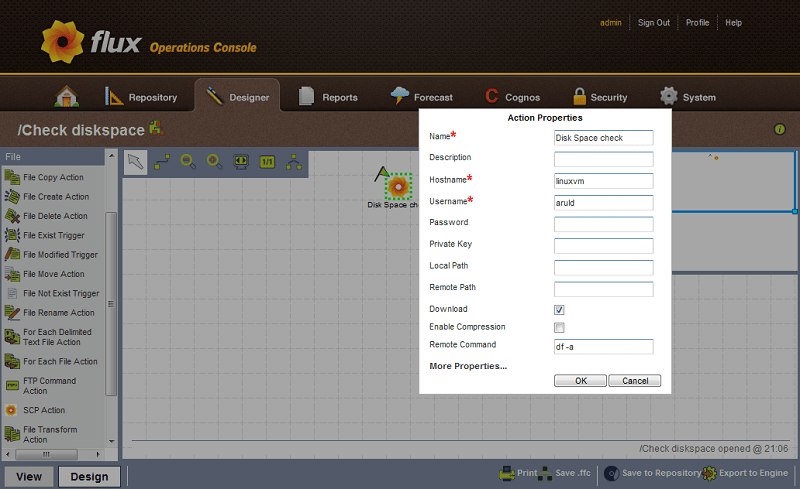
Here is a screen shot showing SCPAction configuration that executes a remote disk check command for a linux host.
A sample test case that shows how this action could be integrated within a Flux workflow using Java API.
This file contains hidden or bidirectional Unicode text that may be interpreted or compiled differently than what appears below. To review, open the file in an editor that reveals hidden Unicode characters.
Learn more about bidirectional Unicode characters
| Factory factory = Factory.makeInstance(); | |
| EngineHelper helper = factory.makeEngineHelper(); | |
| FlowChart flowChart = helper.makeFlowChart("SCP Action Example"); | |
| SCPActionFactory scpActionFactory = (SCPActionFactory) flowChart.makeFactory("SCPActionFactory"); | |
| SCPAction downloadFile = scpActionFactory.makeSCPAction("SCP Download"); | |
| downloadFile.setHost("arul-ubuntu"); | |
| downloadFile.setUsername(System.getProperty("user.name")); | |
| downloadFile.setDownload(true); | |
| downloadFile.setRemotePath("Downloads/jdk-1_5_0_22-linux-i586.bin"); | |
| downloadFile.setLocalPath("/tmp/"); | |
| SCPAction uploadFile = scpActionFactory.makeSCPAction("SCP Upload"); | |
| uploadFile.setHost("arul-ubuntu"); | |
| uploadFile.setUsername(System.getProperty("user.name")); | |
| uploadFile.setDownload(false); | |
| uploadFile.setRemotePath("/tmp/"); | |
| uploadFile.setLocalPath("/tmp/jdk-1_5_0_22-linux-i586.bin"); | |
| downloadFile.addFlow(uploadFile); | |
| SCPAction remoteExec = scpActionFactory.makeSCPAction("Remote Exec"); | |
| remoteExec.setHost("arul-ubuntu"); | |
| remoteExec.setUsername(System.getProperty("user.name")); | |
| remoteExec.setRemoteCommand("df;uptime"); | |
| uploadFile.addFlow(remoteExec); | |
| JavaAction javaAction = flowChart.makeJavaAction("Java Action"); | |
| javaAction.setListener(RemoteCommandResult.class); | |
| remoteExec.addFlow(javaAction); | |
| String name = engine.put(flowChart); | |
| System.out.println("Scheduled job : " + name); |
Maven users could just drop this dependency in your POM to use this plugin in your project.
  com.fluxcorp.plugins
  scp-action
  1.0.3.SNAPSHOT
Make sure you include this maven repository where the plugin snapshots are deployed.
  sonatype-nexus-snapshots
  sonatype-nexus-snapshots
  https://oss.sonatype.org/content/repositories/snapshots/
There are few more interesting plugins available, you can check the project wiki for more details. Download the latest Flux 7.11 version and check out these cool plugins. Enjoy!
 Blogging at the speed of thought